
ATS-friendly CV: what actually blocks you, seen from inside the software

It's probably the most repeated piece of job-market advice out there: your CV would get rejected by a robot before a human ever sees it. The usual recommendations follow: add keywords, avoid columns, don't use tables.
Part of it is accurate. The rest keeps a false picture of what actually happens alive.
At Bluecoders, we use an ATS every day. So we see CVs from the other side, once they've been through the grinder. And what actually blocks a CV is almost never what these articles claim.
Here's what we observe.
Note: this article is written from the perspective of tech recruiting, but the mechanics described apply to any profession. A file format doesn't know what industry it's in.
Key takeaways
- An ATS almost never rejects a CV on its own. It's a database consulted by a human. The real risk isn't being refused, it's not surfacing in the results.
- What actually breaks is text extraction, not the layout itself.
- The most reliable test is free and takes 30 seconds: open your PDF, select all, copy, paste into a plain text editor. What you see is what the machine sees.
- Tech profiles have specific traps that generic advice ignores: exports from Canva or Notion, an isolated stack list, client-site placements.
- Stuffing your CV with keywords is becoming counterproductive, as recent tools search by meaning rather than literal matching.
- A free ATS-friendly CV template is available for download at the end of the article, no sign-up required.
An ATS is not a robot that sorts
Let's start by correcting the picture.
An ATS, or Applicant Tracking System, is software for managing job applications. Our tech glossary gives the full definition, but here's the essential part: it's a database, paired with a search engine and a pipeline tracker. Not an automatic jury.
Concretely, when you apply online:
- Your file is parsed and split into fields: name, contact details, experience, dates, skills, education
- These fields are stored in a database
- A recruiter searches it, with keywords or in natural language
- They open the profiles that come up
Automatic elimination does exist, but it stays rare and crude: it generally applies to a disqualifying criterion declared in the application form, such as a location or a mandatory work permit. The vast majority of applications are never rejected by the machine. They're simply filed away somewhere, and never found again.
That distinction changes everything. The goal isn't to "pass a filter." The goal is to be findable.
How matching actually works
2 distinct steps, and they don't get fixed the same way.
Parsing
This is the reading of the file. The software turns your PDF into text, then tries to recognize the structure: this is a job title, this is a date, this is a skill.
This is where 90% of the problems happen. If the text extracts poorly, or if the blocks come out in the wrong order, everything that follows is skewed. Your 8 years of experience can end up attached to the wrong employer, or your stack filed under "education."
Search
Once your data is stored, the recruiter queries the database. For a long time, this happened through literal matching: they type "React," the engine searches for the string "React."
This is the mechanism that produced the universal advice to stuff your CV with keywords.
Except that's no longer the only mode. Recent tools add semantic search: they understand that a "Next.js" developer works in React, that an "SRE" partly overlaps with a "DevOps" role, that a fanciful job title can describe a standard position.
We use Marvin, a French ATS published by Christophe Hébert, who is also the founder of Bluecoders. Its core argument is exactly that: with keyword search, a good candidate disappears the moment their job title doesn't match exactly. With natural-language search, they still come up.
Practical consequence: stacking keywords loses value, and context gains it. A semantic engine understands "zero-downtime Kubernetes migration." It has no use for a list of 35 technologies with no sentence around them.
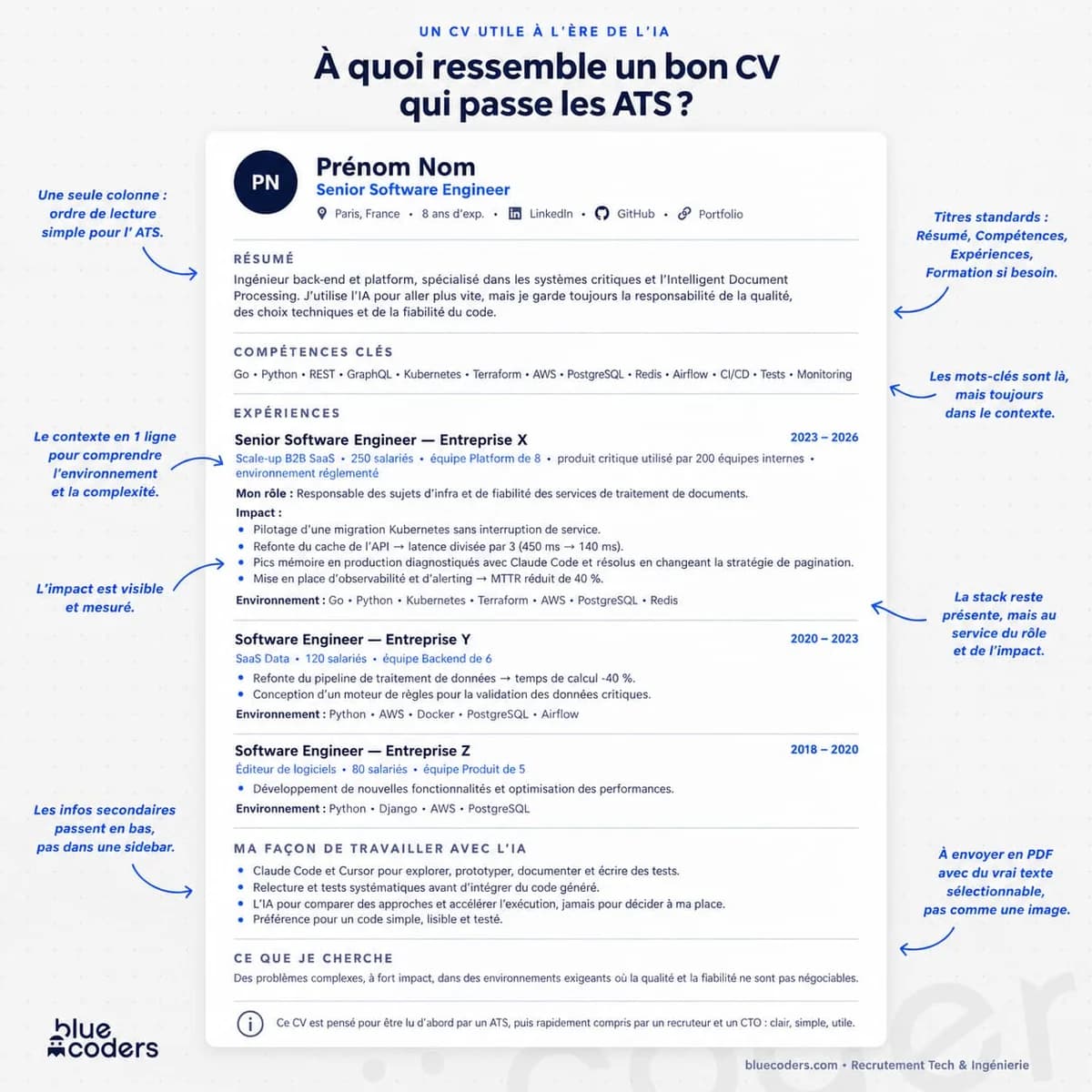
What actually breaks parsing
Here are the real causes, in order of frequency.
Columns and sidebars
The classic. A 2-column CV displays perfectly on screen, but the file itself contains the blocks in a given order. A sidebar is almost always read after everything else.
Your skills then end up after your 3 roles, detached from the context they belong to. At best this is confusing, at worst the block gets attached to the wrong place entirely.
Tables and text boxes
Many elegant templates rely on invisible tables or floating text boxes to position elements. Text boxes are frequently ignored when read. Tables, on the other hand, are read cell by cell, which breaks sentences apart.
If you don't know what your template contains under the hood, it's probably one of the two.
Headers and footers
Putting your name, phone number, or email in the Word header is a natural instinct. It's also the least reliable spot in the document. Many parsers don't read it at all. The result is a profile with no contact details.
A CV exported as an image
A CV saved as a JPG, or a PDF generated from a screenshot, contains no text at all. The software has nothing to extract. This is the only case where a CV is genuinely invisible.
Something sneakier happens with some PDFs generated with custom fonts: the text technically exists but extracts poorly, and words run together.
Decorated section headings
A detail that costs more than it looks. Some templates letter-space their headings by inserting real spaces between characters. The file then contains E X P E R I E N C E, and no engine will connect that to "experience."
Same logic for icons prefixing headings. Decorative symbols confuse recognition, and some, like chevrons, can even be interpreted as markup.
Stick to standard headings: Summary, Skills, Experience, Education.
The traps specific to tech profiles
This is where generic advice stops being enough.
A stack list delivered on its own
A developer's CV is naturally full of keywords. It's often the only content: a long list of technologies, with no context.
So the problem flips. You don't have a keyword deficit, you have a sentence deficit. A semantic engine and a CTO are looking for the same thing: what problem did you apply this technology to. Attach each piece of your stack to the role where you actually used it, rather than stacking everything in an isolated block.
A CV exported from Notion, Canva, or Figma
These tools produce beautiful documents, and that's exactly the risk. Canva and Figma rely heavily on freely positioned blocks, which produces PDFs with an unpredictable reading order. Notion exports cleanly but flattens the entire hierarchy.
This isn't a dealbreaker, but it needs to be checked systematically, with the test in the next section.
A LaTeX CV
Good news for anyone using it: a PDF produced by LaTeX generally extracts very well, because the text is genuinely text.
Watch out, though, for 2-column templates, which are very common among LaTeX CV templates, and create exactly the same reading-order problem as everywhere else.
GitHub and portfolio links
A link is not content. No ATS will go and clone your repository. If a project matters, it needs to exist as text in the CV, with a line saying what it does and what you contributed to it. The link is a bonus, never a replacement.
The same principle applies to your developer portfolio: it convinces a human, it doesn't get itself indexed.
Client-site placements and IT consulting firms (ESN)
A career spent on client-site placements, with a French IT consulting firm (ESN), often produces an ambiguous structure: the official employer is the consulting firm, but the actual work happened elsewhere, sometimes across 6 different placements in 4 years.
A parser faced with this structure attaches dates and titles incorrectly. The most readable approach is to declare the consulting firm as the employer, with a start and end date, then list the assignments as sub-items underneath. You lose a bit of the list effect, you gain a coherent timeline.
How to know if your CV passes ATS screening
The question keeps coming up, and the answer takes 30 seconds. No paid tool required.
The copy-paste test.
- Open your CV as a PDF
- Select all, then copy
- Paste into a plain text editor, Notepad or TextEdit in plain-text mode
What you get is very close to what an ATS sees. Read it, and ask yourself 4 questions:
- Is the order correct? If your skills come after your experience even though they're displayed on the left, your sidebar is detached.
- Are the words properly separated? Merges like
andtheteamorScale-upB2BSaaSsignal a font or export problem. - Are your contact details there? If they're missing, they're probably stuck in the header.
- Are your section headings intact?
EXPERIENCE, notE X P E R I E N C E.
If the pasted text is clean and in the right order, your CV passes. If it's unreadable to you, it's unreadable to the machine.
Online scanners do roughly the same thing, with a score on top. The score adds nothing, and many of these tools mainly exist to sell you a subscription to a CV builder.
What doesn't help, and what backfires
3 pieces of advice still circulate even though they're useless at best.
Writing keywords in white text on a white background. The idea is to saturate the search without altering the visual rendering. This has been detected for a long time, and the text shows up anyway in a copy-paste, right in front of the recruiter. The effect produced is the opposite of the one intended.
Copying the job posting word for word. Reusing the posting's vocabulary is useful; copying it outright is immediately visible on a read-through. And in front of a semantic engine, it brings no extra advantage.
Chasing a high "ATS score." This score is an invention of the tools that sell it. No ATS on the market assigns a grade to a CV. What does exist are match scores against a specific job, calculated on the recruiter's side, and you have no control over them.
Free ATS-friendly CV template to download
We built a free ATS-friendly CV template that respects everything above: a single column, no table, no text box, standard headings, genuinely extractable text.
It's available for free download, no sign-up and no form:
The Word file also opens in Google Docs and LibreOffice. Replace the content with your own while keeping the structure.
And to know what to write in it, once the format is sorted, our article on the 5 things tech recruiters look for on a CV breaks down a CTO's reading grid.
In summary
An ATS doesn't refuse you. It files you. The whole point is to come back up when a recruiter searches.
For that, format matters more than optimization. A single column, standard headings, text that extracts cleanly, and context around your technologies rather than an isolated list. The rest is mostly myth.
And the check takes 30 seconds of copy-pasting.
Looking for your next tech role? Check out our open positions. We support every candidate through the end of their trial period.
Hiring a technical profile? Let's talk about what you need.
FAQ
Can an ATS really reject my CV automatically?
It's possible but rare, and it's generally limited to a disqualifying criterion declared in the application form, such as a geographic zone or a work authorization. The main risk isn't rejection, it's not surfacing in the recruiter's searches. A poorly extracted CV isn't rejected, it becomes unfindable.
How do I know if my CV is ATS-friendly?
Open your PDF, select all the content, copy it, and paste it into a plain text editor. Check 4 points: the reading order, word separation, the presence of your contact details, and the integrity of your section headings. If the result is readable and in order, your CV passes. This free test is worth most paid scanners.
Should I send my CV as a PDF or as a Word file?
PDF is preferable in the vast majority of cases, as long as it contains real text and not an image. It preserves the layout regardless of what opens it. Only send a Word file if the job posting explicitly asks for one, which some large companies still do.
Is a 2-column CV disqualifying?
No, but it's risky. The sidebar is most often read after the rest of the document, which detaches your skills from their context. If you want to keep this format for a direct send to a human contact, keep a single-column version for online applications.
Do CVs made on Canva pass ATS screening?
It depends entirely on the template chosen. Canva lets you position blocks freely, which often produces PDFs with an unpredictable reading order. The visual result says nothing about the outcome. Always test the exported file before sending it.
How many keywords should a CV have?
This question matters less and less. Recent ATS search engines work partly by meaning, not only by exact matching anymore. A few well-contextualized technologies beat a long isolated list. Reuse the posting's vocabulary where it genuinely matches your reality, and stop there.
Where can I find a free ATS-friendly CV template?
Ours is available for download higher up in this article, in Word and LaTeX format, with no sign-up and no form. Be wary of free ATS-friendly CV templates used as bait toward a subscription to a CV builder: many require an account, a watermark, or a 2-column layout that cancels out the very compatibility they advertise.
Does a LaTeX format cause problems for ATS?
Quite the opposite: a PDF produced from LaTeX generally extracts very cleanly, because the text is genuinely text. The only pitfall is the layout, since many LaTeX CV templates are built on 2 columns, which recreates the reading-order problem.
What should I do with a career made of many client-site placements with a consulting firm?
Declare the consulting firm as the employer, with your start and end dates, then list the assignments as sub-items attached to that period. The timeline stays coherent for the parser, and the recruiter immediately understands the structure of your career.